
Skip to content

Listary V7 is here

Download Listary V7 Beta

The headline updates in Listary V7

The Launcher now recommends files

Open the Launcher, and without typing a single keyword, your recent files and folders are already there. The document you were just editing reopens with one key.

Much of the time, what you need is right there and the search step is gone. The better it knows you, the less you have to do. Next, you'll be able to pin your go-to files so they stay in the list.
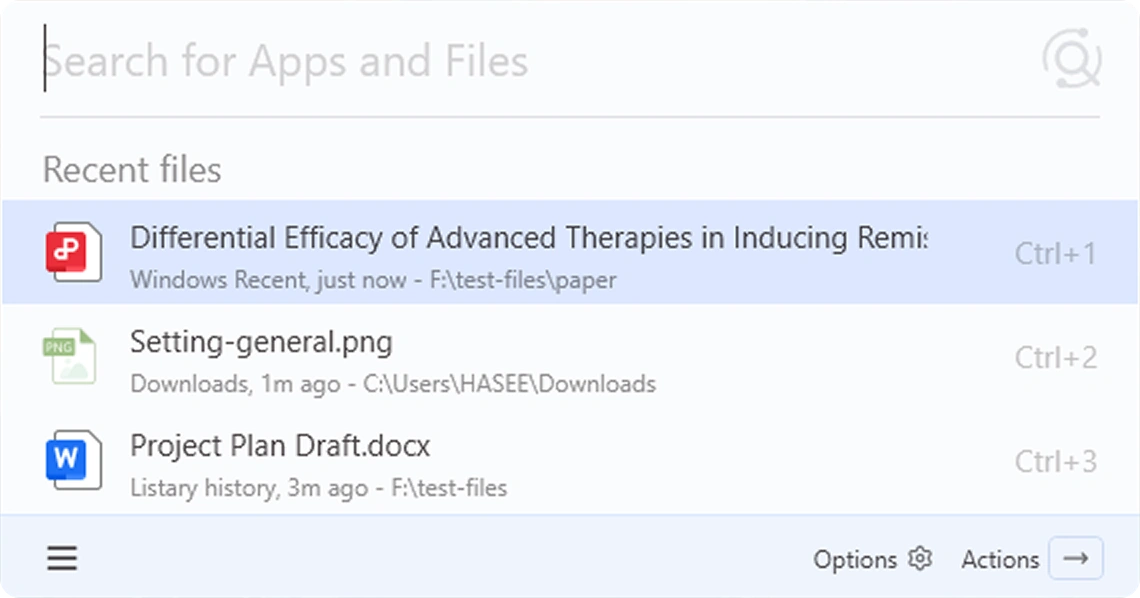
Listary V7 launcher recommending recent files before any input

Settings and themes

The settings pages have been reorganized, so options that used to hide deep in menus are now in plain sight. Multiple new theme colors arrive, and dark mode reaches every screen.

For a tool you use countless times a day, looking good and feeling smooth changes how work feels.
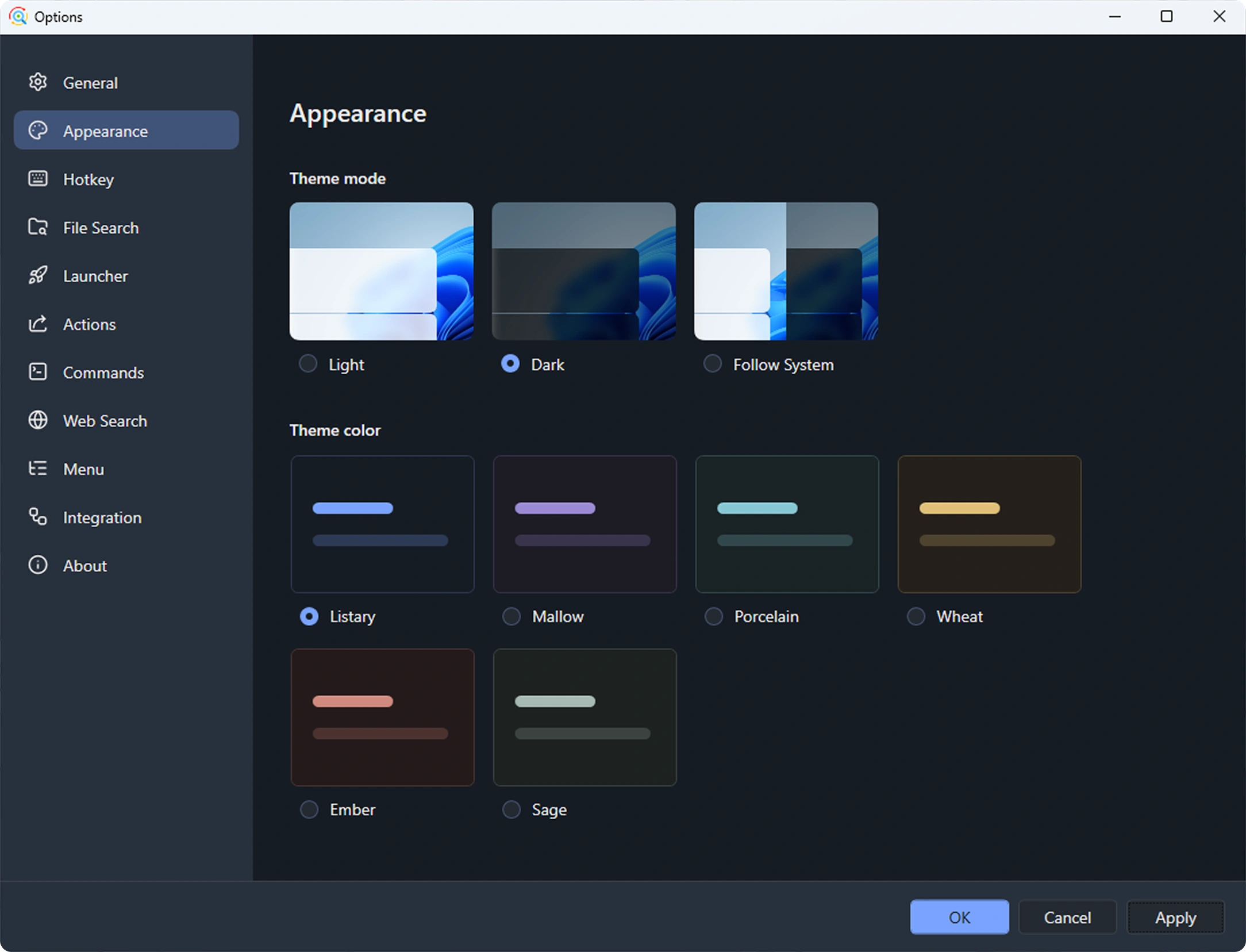
Listary V7 settings in dark mode with theme color presets

Launcher UI upgrade

A new footer shows the shortcuts right on it. No more memorizing the hotkeys you use every day.
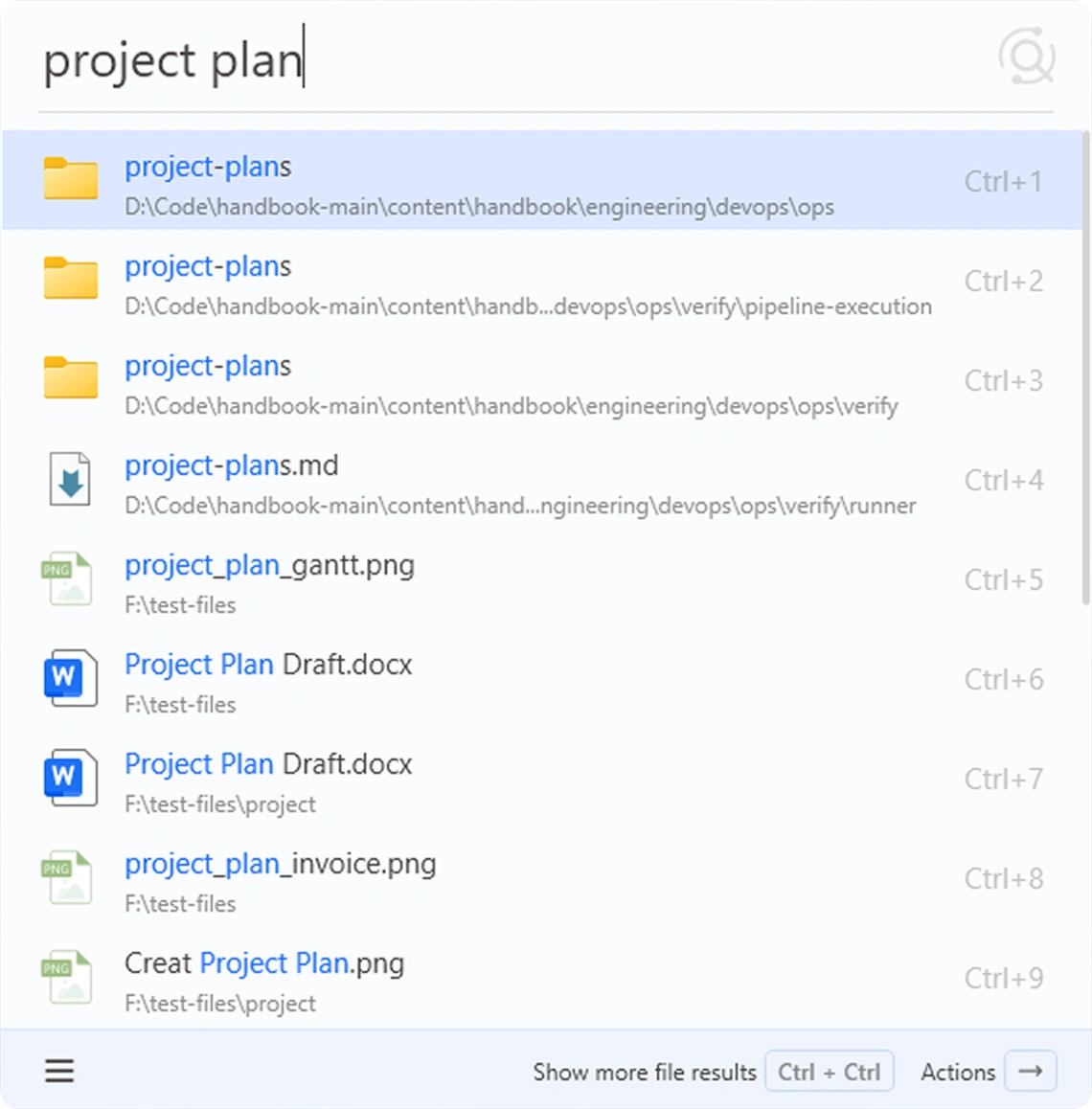
Listary V7 launcher with shortcut hints on every result and in the footer

Preview panel, upgraded

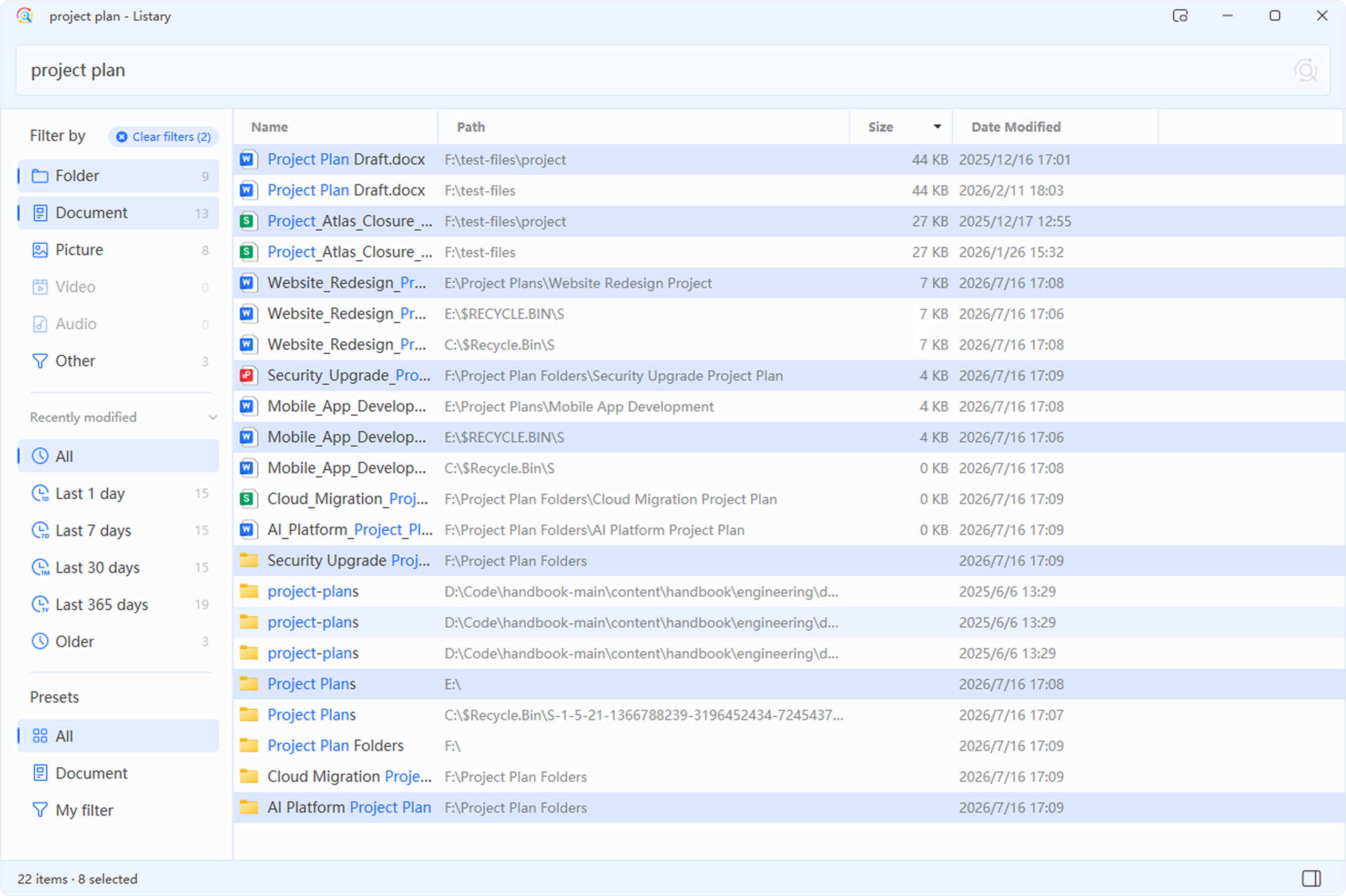
Preview file contents right in the result list, not just an icon or a thumbnail.
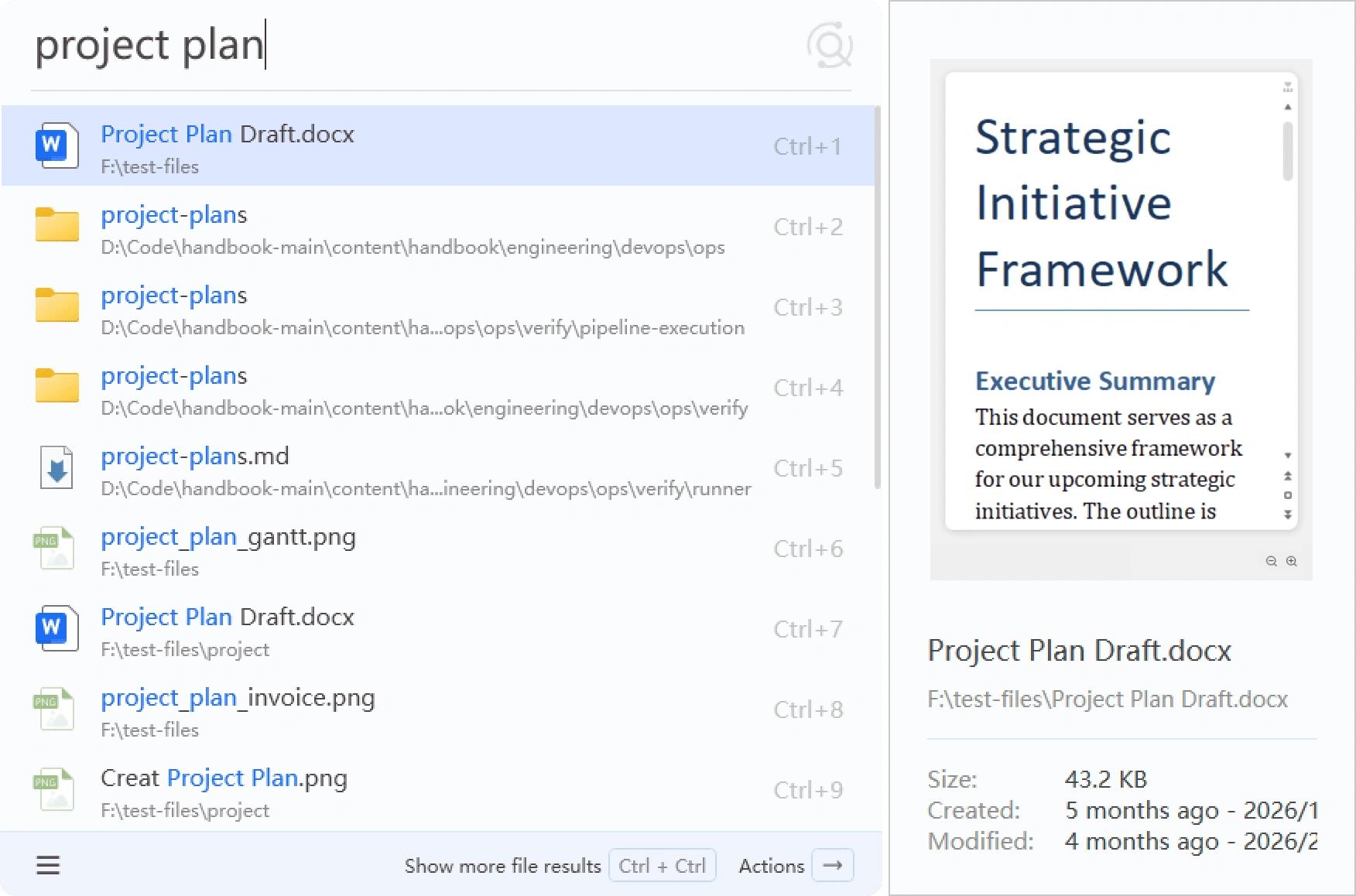
Listary V7 search results with a preview pane on the right

A brand-new engine

The search core has been rebuilt: memory use is down 30%, speed is up 20%. More importantly, the old architecture's limits are gone, and it now supports more columns to filter and sort.

Advanced search syntax

Combine extensions, modified dates, file sizes, exact phrases, and exclusions directly in the search box to narrow results precisely.

  • Filter exact formats with ext:pdf;docx or *.pdf.
  • Filter by time and size with expressions such as date:week and size:>10mb.
  • Use exact phrases and exclusions, such as "annual report" -draft.
View the complete advanced search syntax documentation →

Everything above is live. Try it today.

Listary finds the file. Gety gives you the answer.

It's worth mentioning that alongside Listary, the team has also been developing a brand-new app called Gety.

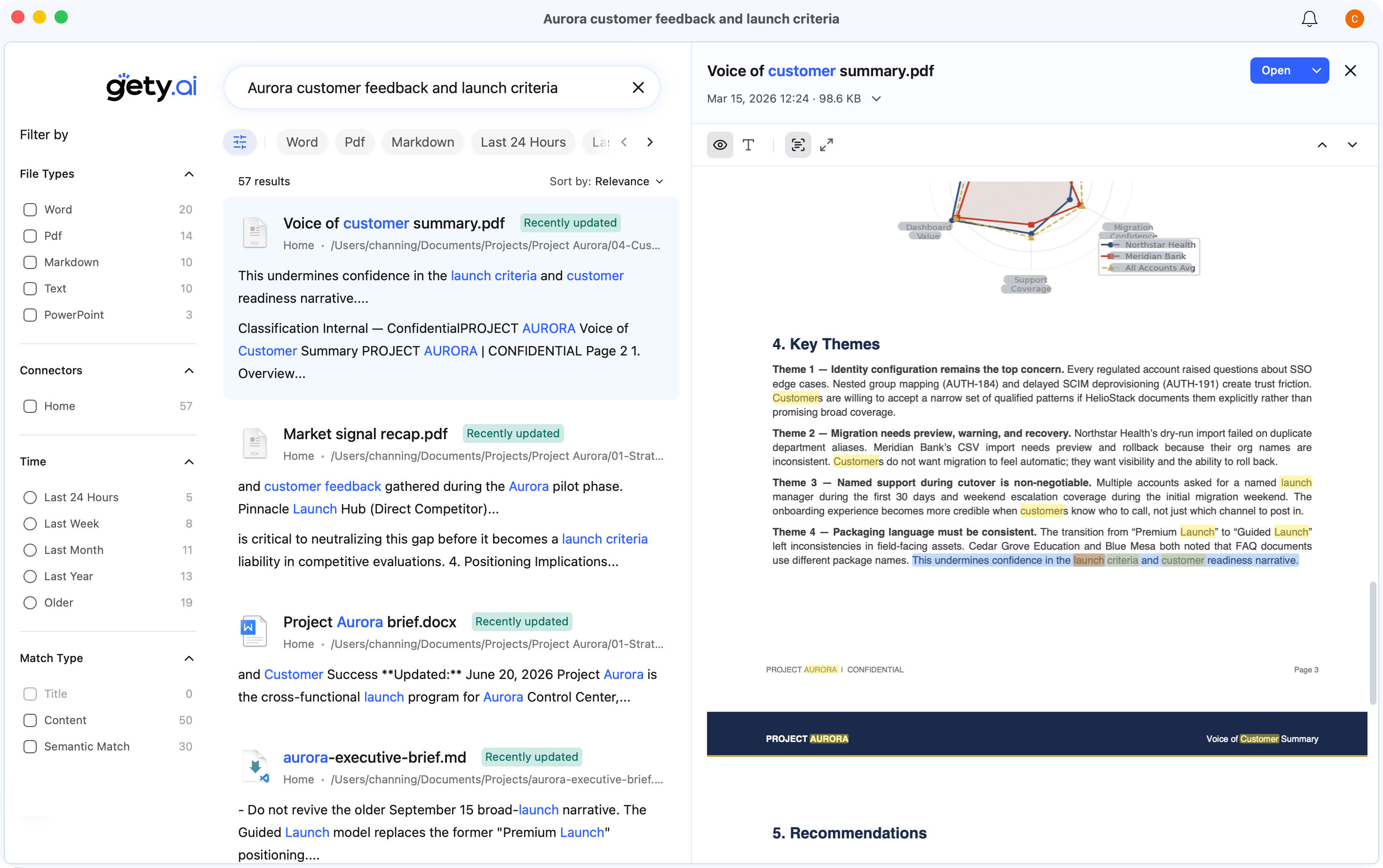
When you only remember what's inside a file, hand it to Gety, a companion app from the Listary team. It runs full-text search across PDFs, scans, and Office files, built for serious work.

Integration with Listary

Listary launcher showing Gety integration results with semantic search, snippets, and OCR matches

Go deeper into file contents in Gety

Gety searching for customer feedback, with results on the left and every match highlighted in a PDF preview

What Gety can search

Documents — PDF, Word, PPT, Excel, and WPS, all rendered clearly.

Scans & screenshots — Leading on-device OCR makes scans and screenshots searchable.

Any source — WeChat, email, cloud drives, and more, through connectors.

A smooth experience

See the answer without opening the file — It jumps to the answer and highlights it, so you never flip through hundred-page documents again.

Your AI can use Gety too — Gety searches your real work documents and feeds the AI the context it needs, in real time, so it stops guessing.

How Listary and Gety work together

Use Gety from Listary — Type gety plus a space to search file contents directly, or continue in Gety when filename search finds no matches.

A search experience like never before. Starting now.

On the V7 roadmap

Done

  • Settings and themes

    Jul 2
  • Launcher UI upgrade

    Jul 2
  • Preview panel, upgraded

    Jul 2
  • A brand-new engine

    Jul 2
  • AI access

    Jul 2
  • Listary × Gety integration

    Jul 8
  • Advanced search syntax

    Jul 15

In progress

  • A more powerful File Search Window

    Jul 2Jul 15
  • Faster window switching

    List every folder you have open, not just the most recent one, for smoother switching between them.

  • Custom recommendations

    Launcher recommendations become customizable: set your own go-to folders so they're there the moment you open it.

  • Pin files / folders

    Pin important files or folders to the top of the Launcher, one key to open, and they never shift with recent-use history.

  • Launcher UI polish

    Make the actions and layout feel more natural to use.

  • @ filters

    Type @ to pick filters and commands in a flash, with no keywords left to remember.

Further out

  • Clipboard history search

    Search the text, links, and snippets you've copied, directly.

  • Browser history plugin

    Bring browser history and more sources into Listary.

Which one should ship first? Tell us.

Changelog

v7.0.0.9 Beta

Major Improvements

  • Faster, more reliable file indexing: Reduced unnecessary repeated scans at startup and improved update speed for large folders. When network drives, removable drives, or file monitoring are temporarily unavailable, Listary now preserves existing search results where possible and recovers automatically.
  • More accurate search results: Fixed incorrect modified dates, file sizes, and folder types for some files, and improved matching accuracy for complex folder conditions.
  • More reliable Quick Switch in File Explorer: Improved how Quick Switch recognizes File Explorer, fixing cases where it could not switch folders in some windows, occasionally stopped working, or left behind stale state.
  • Better high-DPI and multi-monitor support: Fixed incorrect size and position when the File Search Window is first opened on displays with different scaling settings, and improved the clarity of text, icons, and borders in the Launcher.

Other Improvements

  • Advanced search syntax now supports the full-width Chinese colon, such as ext:pdf.
  • Recently visited folders are now deduplicated automatically, reducing repeated entries.
  • Light and dark themes now follow the Windows app theme setting more accurately.
  • Separator lines in the menu editor can now be deleted correctly.
  • Improved borders, shadows, and other visual details in several windows.

Fixes

  • Fixed Listary failing to start when certain settings folders are not writable, with clearer recovery guidance.
  • Fixed startup failures in multi-user and Remote Desktop environments.
  • Fixed occasional exits caused by errors in file associations, background tasks, and the local HTTP API.
  • Fixed an additional error that could appear during exit after the File Search Window failed to initialize.
  • Fixed the service failing to recover automatically after a temporary timeout.
  • Fixed several issues that could cause indexes to be lost, search results to become outdated, or unnecessary background rescans.

v7.0.0.7 Beta

Improvements

  • Moved "Search this folder's contents with Gety" to the end of the action menu.
  • Improved the stability of file search, indexing, and preview.
  • Improved compatibility with special file names, long paths, and Pinyin search.

Fixes

  • Fixed a crash that could occur when copying file paths.
  • Fixed web links failing to open in some cases.
  • Fixed Listary failing to start or exiting unexpectedly in some environments.
  • Fixed several issues that could cause incorrect search results or index failures.

v7.0.0.5 Beta

New: Category result counts in the File Search Window

  • The File Search Window now shows result counts for different file types and modification-time ranges. You can see how results are distributed before selecting one or more conditions to narrow them down.
  • Select multiple file types, including documents, pictures, videos, and audio.
  • Combine file types, modification times, and custom presets.
  • Browse files by category without entering a search query.
  • Clear all filters in one click to restore the complete result list.

New: Advanced search syntax

  • Added extension filters such as ext:pdf and ext:pdf;docx.
  • Added *.pdf as a quick way to filter by a specific format.
  • Added modified-date filters such as date:today, date:week, and date:2026-07.
  • Added file-size filters such as size:>1gb and size:10mb..1gb.
  • Added exact phrase matching with quotation marks, for example "annual report".
  • Added exclusions for keywords, file types, and extensions with -, for example report -draft -ext:tmp.
  • Multiple conditions can be freely combined, for example doc: date:week -draft contract.
  • See the Listary v7 advanced search syntax documentation for the complete syntax, combination rules, and more examples.

Improvements

  • Significantly improved input, refresh, and large-result-set browsing performance in the File Search Window.
  • Improved file index startup, update, and persistence behavior.
  • Improved the settings experience for file types and custom filters.
  • Improved Chinese Pinyin search matching.
  • Improved title bars in the File Search Window and Options window.
  • Improved the tray menu in light, dark, and system themes.
  • Improved the preview pane size, spacing, and window styling.
  • Improved feature hints in the launcher footer.
  • Improved accessibility support in the File Search result list.
  • Added and refined localized interface text.

Fixes

  • Fixed searches that could become slow or unresponsive, or fail to return results.
  • Fixed result display issues when typing quickly or clearing the query.
  • Fixed several stability issues during index recovery and background updates.
  • Fixed some Chinese Pinyin queries that did not match correctly.
  • Fixed preview pane display issues at certain screen positions and display scale settings.
  • Fixed some interface elements not updating immediately after switching themes while Listary was running.
  • Fixed related hints not updating after the preview hotkey was changed.
  • Fixed several issues in file type and custom filter settings.
  • Fixed interface styling issues in some dark-theme scenarios.

v7.0.0.3 Beta

New: Gety Full-Text Search Integration

  • Added a new gety keyword mode. Type gety followed by a space to start a Gety content search directly.
  • When Listary cannot find matching file-name results, you can continue the search in Gety to search inside file contents.
  • Gety content results can be used like regular file results: open the file, open its containing folder, preview it, open the action menu, and more.
  • The preview pane can now show content snippets from Gety matches.
  • Added “Search contents in this folder” to the action menu for folder results.
  • Added a new “Full-Text Search” settings page where you can check Gety status and manage content-search prompts and inline results.
  • When Gety is not installed, Listary can show a dismissible learn-more entry in relevant situations. After Gety is installed, these entries automatically become functional entry points.

Improvements

  • Significantly improved launcher opening speed and typing experience.
  • Significantly improved scrolling and refresh performance for large result sets in the File Search Window, making scrolling smoother and reducing typing stalls.
  • Significantly optimized search engine memory usage, reducing peak memory during index building and large result searches.
  • Improved history storage.
  • Improved path exclusion rules for history and recommendations. Paths excluded from search will no longer appear in history results, recommendations, or recent-folder entries.
  • Improved GPU selection on hybrid-GPU devices, reducing cases where Listary keeps the discrete GPU active and interferes with automatic GPU switching or Surface Book detach.
  • Added and refined multilingual UI text.

Fixes

  • Fixed cases where NTFS indexing could fail because of invalid modified times, unreadable directories, or special paths.
  • Reduced excessive engine logging and oversized log files caused by abnormal data.
  • Fixed several issues that could occur when opening the launcher quickly.
  • Fixed cases where the search window could not be brought to the foreground correctly.
  • Fixed inconsistent apply/cancel behavior when deleting actions, filters, and priority rules in settings.
  • Fixed possible flicker or brief layout instability when closing the settings drawer.
  • Fixed disappeared files still appearing with normal file icons; they now show a clearer disabled state.
  • Fixed several race conditions and error-handling issues in the search engine during shutdown, index rebuilds, and file-change application.
  • Fixed USB eject error.

v7.0.0.1 Beta

Search Engine

  • Rewritten from the ground up on a new Rust stack, faster and more stable
  • The engine now runs inside the main process for better stability and lower memory use
  • Multi-select acts on many results at once: copy, cut, delete, or copy path
  • A Size column, with sorting by size and by path
  • A high-performance list that scrolls smoothly through very large result sets
  • Robust shell preview for every file type, running off the UI thread with no stutter or focus loss
  • Deleted results now show as tombstones instead of vanishing

Launcher

  • Recent-file and recent-folder recommendations on empty input, with hide and exclude controls
  • A mode-aware footer that shows shortcut hints
  • Action hotkeys surfaced in the launcher and the Action menu

Options

  • A redesigned settings interface with drawer-style controls
  • A refined theme color system with presets
  • HTTP API settings and an in-app API documentation dialog
  • Index diagnostics and a diagnostics summary tool
  • Account activation entry and a manage-devices link on the license page

Themes

  • Theme color presets, with chrome colors aligned across every screen

HTTP API

  • A local HTTP search API that lets AI tools and agents query Listary search

Indexing & more

  • Index updates: live folder and NTFS monitoring, applying changes without a restart
  • More languages, discovered automatically from installed language packs

Let Listary supercharge your workflow!