

Listary is already fast. With 7.1, we wanted to see how much further we could take it: faster responses, lower memory use, smoother interactions, and more accurate results.
In 7.0, we rebuilt the search engine. For 7.1, we’ve rewritten the UI, application logic, and background services.
Here’s what that means in practice.
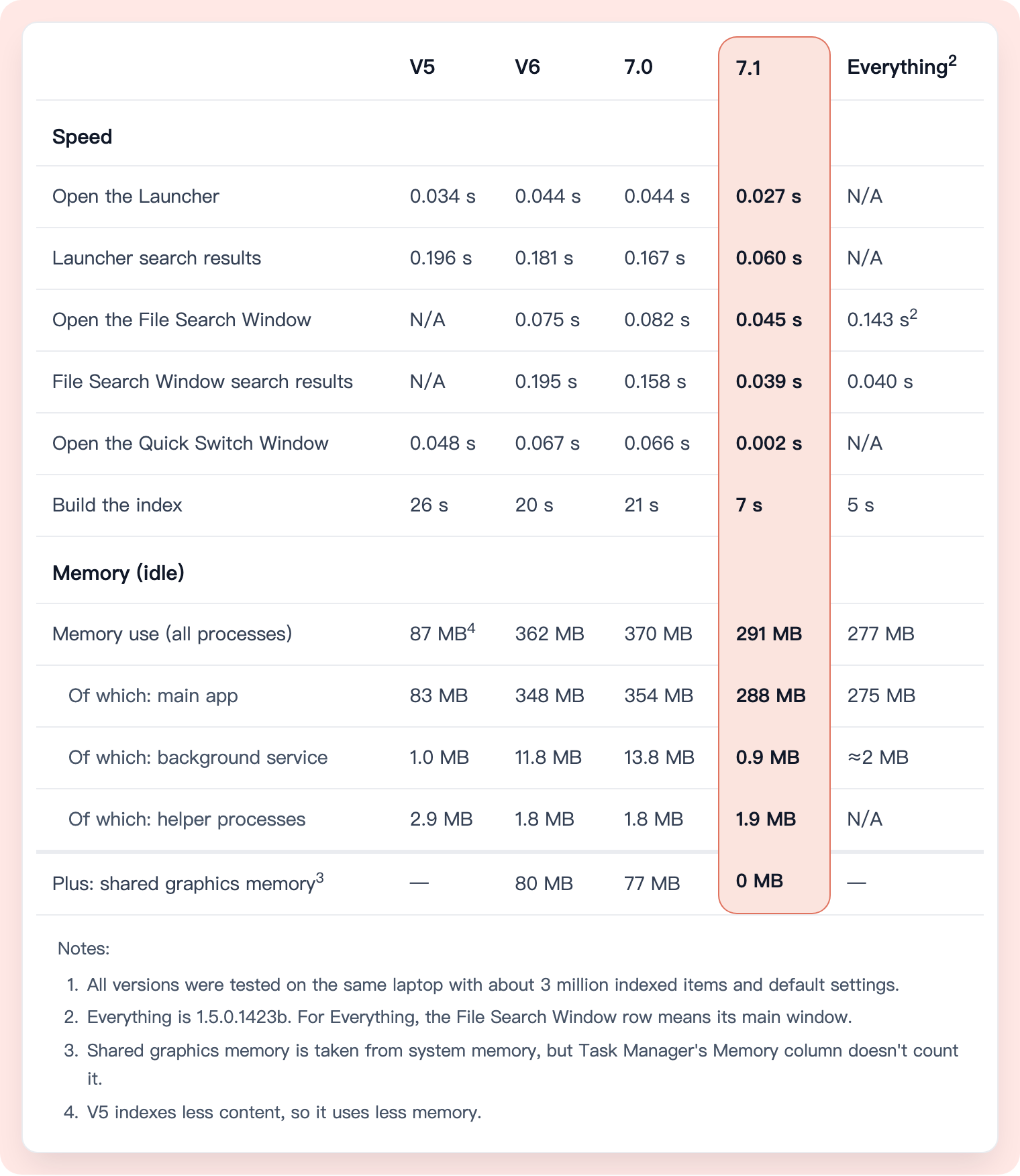
The launcher now opens in 0.027 seconds, down from 0.044 seconds.
The launcher is on screen before you’ve finished a blink.
Fractions of a second matter in competitive gaming, too. A study by NVIDIA found that adding about 0.03 seconds of system latency significantly slowed players down in a shooting task. Small delays are worth chasing down in a tool you use over and over every day.
Search results in the File Search Window now appear in 0.039 seconds, down from 0.158 seconds. That’s about 75% less time waiting for results.
Memory use is down by at least 100 MB.
Listary runs in the background, so it should leave as much memory and processing power as possible for whatever you’re working on. That applies whether you have a powerful desktop or a laptop you’ve been using for years.
We switched to a lighter native UI framework for this rewrite. By default, the main application’s interface now uses software rendering rather than the graphics card.
At idle, total memory use across all processes has dropped from 370 MB in 7.0 to 291 MB, about 21% less. Shared graphics memory has dropped from 77 MB to 0.
Why rewrite so much?
We wrote most of V5’s UI framework ourselves. If something was slow or didn’t feel right, we could trace it all the way down to the code responsible and fix it there. That control was a big part of why V5 felt so fast and responsive.
For V6, we chose WPF to support high-resolution displays and more integrations. It took care of much of the UI work, which helped us add more features to Listary.
But we gradually ran into problems. Typing quickly with an input method could crash the app. Memory use could grow unexpectedly with certain graphics cards. Shadows could make text less clear, and switching between two graphics cards didn’t always work properly. We fixed some issues and worked around others. The hardest ones involved the framework’s internals and the way it worked with the operating system. Getting to the bottom of those often took a lot of work.
We wanted the control we’d had with V5: the ability to get into the low-level code and keep working until the app felt right.
For V7, we chose Rust to rewrite the interface, application logic, and background services, and to build a native UI.
We can now work directly on window management, input handling, and rendering when we need to. We can also maintain our own branch of the framework, making changes, building it, and testing it alongside the app.
The rewrite involved more than 200,000 lines of new Rust code. It was a huge undertaking, but it’s already let us improve details that used to be hard to get at.
Smoother scrolling, even through huge lists
The interface should keep up with you as you type and scroll. The File Search Window shows what that means in practice.
It can list hundreds of thousands or even millions of results at once. In 7.0, scrolling became a problem once you had more than 20,000 results. If you dragged the scrollbar to a part of the list that hadn’t loaded yet, the list wouldn’t update until you’d stopped dragging for about 0.1 seconds.
In 7.1, we changed how data loading and drawing work together. We load the results that need to be shown first, then redraw that part of the list. In a test with 300,000 records, the median time per frame was about 0.007 seconds with the mouse wheel, 0.006 seconds when dragging the scrollbar, and 0.002 seconds when paging continuously with the keyboard. No frame in the test took longer than 0.033 seconds.
Getting text rendering right
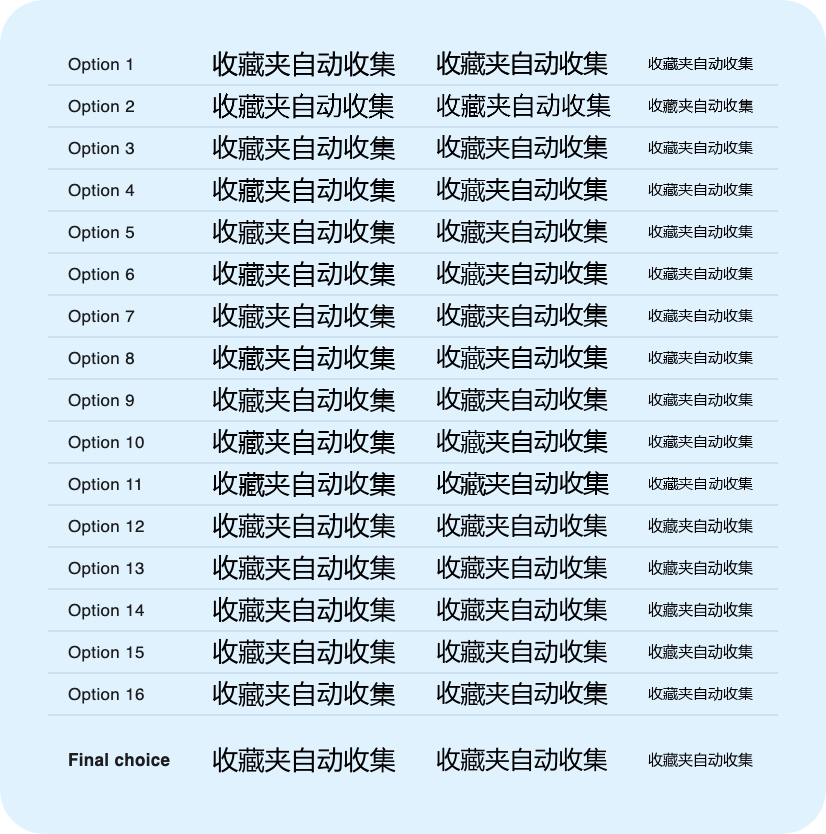
After switching to the new interface, we noticed that some Chinese characters had strokes that ran together. Others sat too high or too low. The same text could even look different in the input field and the results list.
To investigate, we built a standalone text-rendering program. We tested 15 combinations of rendering settings at three font sizes, all with the same font. We checked the gaps between strokes and each character’s vertical position pixel by pixel, then looked at the text at its actual size to see how well it read.
Better software rendering
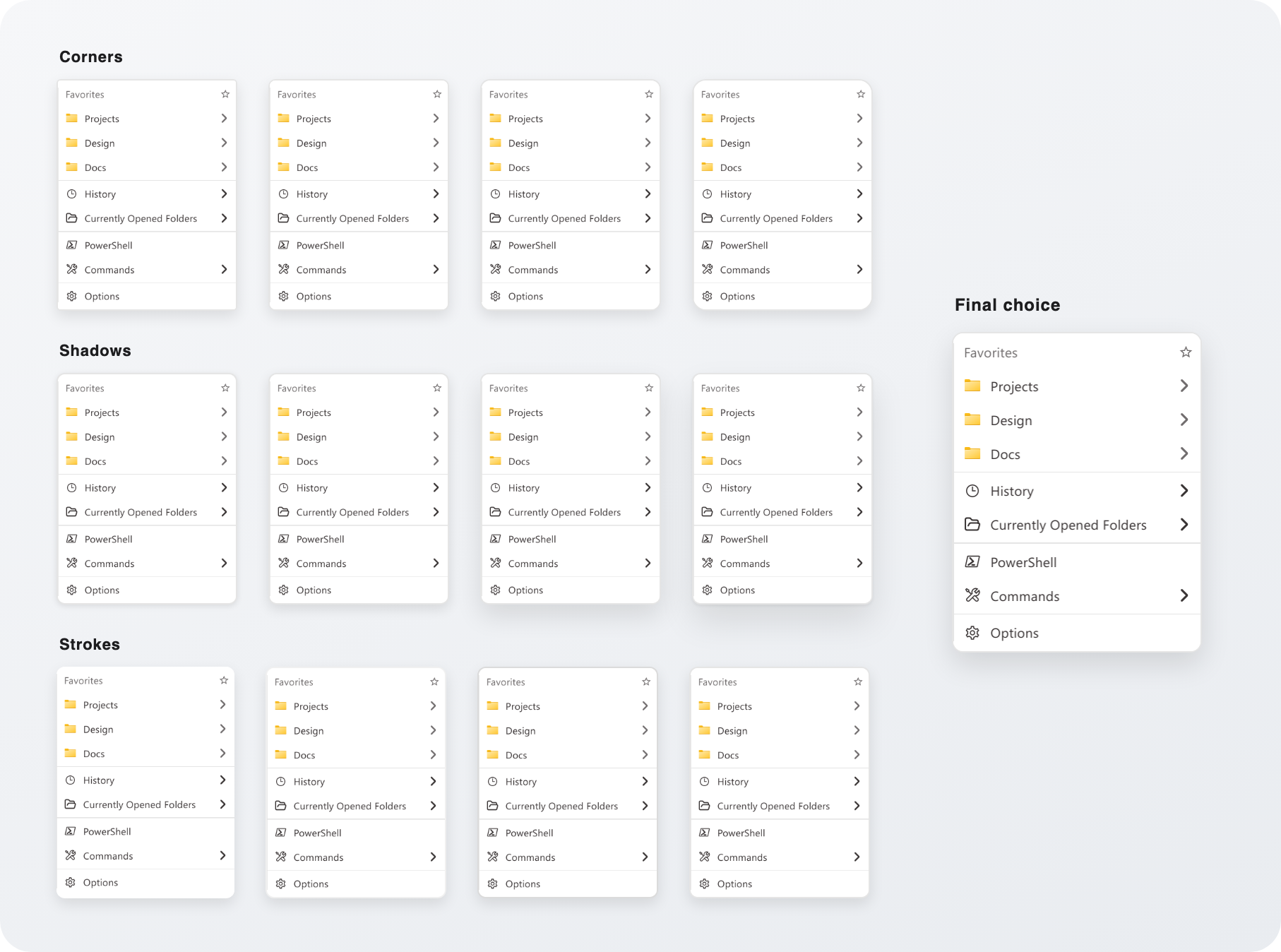
Early in the migration, rounded corners and shadows looked inconsistent from one window to the next. Some shadows were too dark; others were cut off at the edges. Even after we switched to software rendering, we still needed pre-rendered images for shadows. Drawing rounded corners meant splitting the interface into separate pieces.
We looked at how several established graphics projects handled this. Then we added shadow drawing and rounded-corner clipping to our own branch of the UI framework. We made the appearance consistent across windows and fixed how clicks passed through the shadow area.
With that support in the framework, drawing the interface became simpler. The new UI code for this part went from 204 lines to 115. In a standalone benchmark, redrawing the whole window took about 0.0023 seconds, compared with 0.0063 seconds using the old pre-rendered images.
There’s more we want to do with this foundation. We’ll explore frosted backgrounds, keep improving speed and the details of everyday use, and use it to develop a macOS version.
We also have better access to low-level system APIs, so we can improve how Listary works with the operating system. That’s what excites us most about the rewrite: we can finally work on things the old framework made difficult.
An unexpected bonus
A rewrite of more than 200,000 lines of code, with development and testing across platforms, takes a lot of coordination. We built Towery to help us manage it.
Towery lets us focus on deciding what to build, making the key tradeoffs, and checking whether the finished app feels right. AI agents on different computers divide up the work toward the same goal. They pass tasks, context, and results between them, so development, investigation, and testing can keep moving. When they need our judgment, they come back with specific questions and recommendations. Once we’ve decided, they carry on.
It turned out to be more useful than we’d expected. AI agents cut what would have been a year or two of traditional programming down to six months of work. Towery cut that to one month.
We’d like other people to benefit from it too, so we plan to open-source Towery once it’s more mature. You’ll be able to use it to coordinate AI agents on your own work.
What’s next
With the rewrite in place, our priority is matching V6’s features and workflows. There’s more performance tuning ahead, and we’d love to hear what you want us to improve next.
Listary has been in development for 16 years. There’s a lot to carry forward: features, compatibility with different system setups, and small details you rely on every day. A month of internal testing has given us confidence in the beta, but we can’t test every situation. We may still have missed something, and some small bugs may remain.
If you find a problem, please send us feedback. We’ll follow up and fix it. How 7.1 works for you in everyday use will guide the improvements we make next.
Download Listary 7.1.0.37 Beta to try it for yourself. The current installer supports 64-bit Windows 10 and Windows 11.
You’ll find the full list of changes in the changelog.
An ARM version is coming soon. A macOS version won’t be far behind.
